Our Affiliate Program: 93% of Attributed Sales Come From the Branch Listed Last
Join on Afflixo at 5%, then use one spelling of your link. Three attribution branches credit sales; the supplier branch is 93.2%. What triggers a reported sale, and when a refund does not reverse it.
 Avery Bennett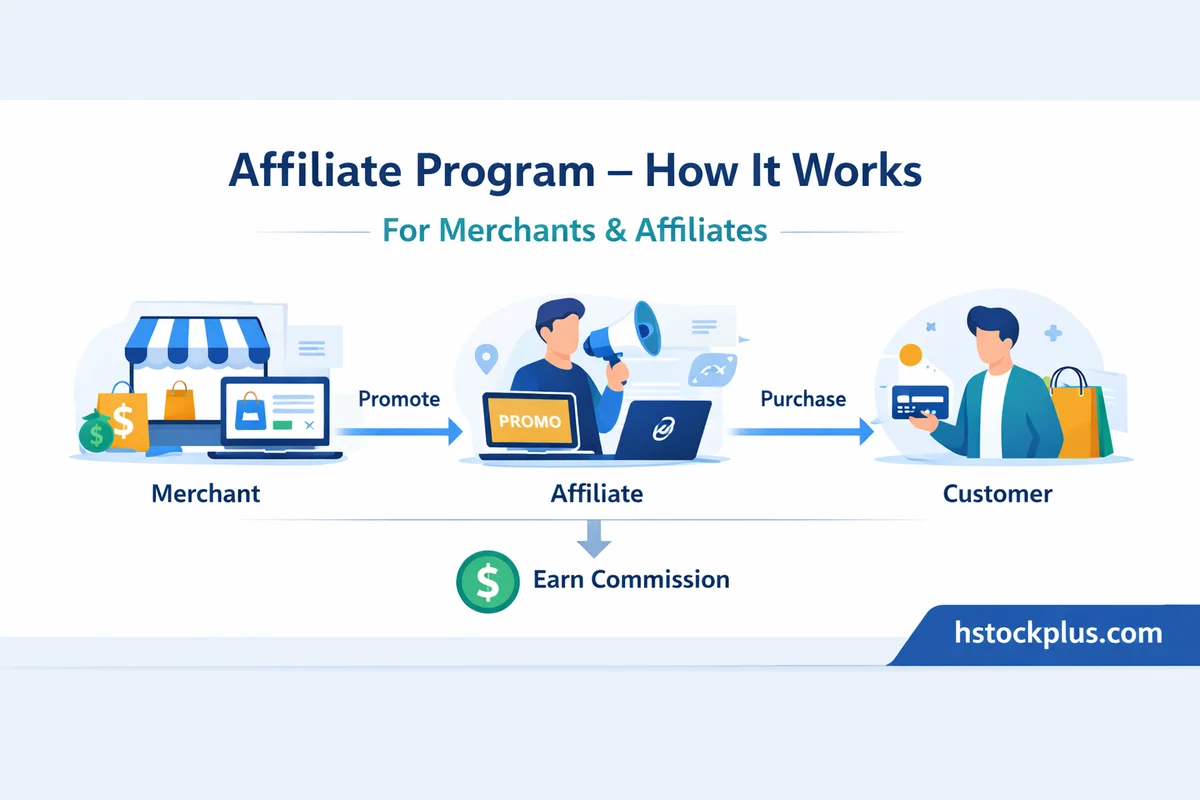
The program runs on Afflixo. Commission is 5% on attributed sales (HstockPlus merchant settings on Afflixo). Signup and link steps are below; the rest of this page is how attribution and reporting actually work on HstockPlus.
How to join: detailed steps
- Open https://afflixo.com/domain/hstockplus.
- Click Join Now. If you already have an Afflixo affiliate account for this merchant, use Affiliate Login instead.
- Create the account with the email and password Afflixo asks for. You do not need a HstockPlus buyer or seller account for this step.
- Sign in to the Afflixo affiliate dashboard for the HstockPlus merchant.
- Copy your referral link or code. Pick one spelling and reuse it everywhere. Capitals and separators are stored exactly as typed, so
Join-Nowandjoin_nowreport as different partners. - Share a HstockPlus URL with your code in the query string, for example
https://hstockplus.com/?ref=YOUR-CODE. That works on a first visit and in a private window. - Track earnings and request payouts in the Afflixo dashboard. That ledger is separate from HstockPlus supplier withdrawals and from the in-house referral code every HstockPlus account also gets.
A shorter walkthrough with the same signup URL lives at How to Join the HstockPlus Affiliate Program on Afflixo. Keep reading here for which referrals actually pay.
An order can be credited to you in three ways, and every version of this page until now explained them in the order the code checks them. That is the wrong order for a partner deciding where to spend effort, because the branch checked last is the one that pays.
Which branch actually pays
Of the orders that have had a conversion reported and carry a recorded attribution source, the split is not close:
- The supplier branch: 93.2%. A seller signed up through your link, and something of theirs was bought. It does not matter who the buyer is or how they arrived.
- The customer branch: 4.6%. A buyer signed up through your link, and later placed an order while logged in.
- The order branch: 2.2%. Somebody arrived on your link and checked out in the same visit.
Read that as a statement about what this marketplace is. A buyer you refer places some orders. A seller you refer is listing stock that many buyers order from, for as long as they keep selling. One recruited supplier is worth an unpredictable number of recruited customers, and the numbers say the difference is roughly twenty to one.
The signup data agrees. Of the accounts that carry an affiliate code from registration, 25 are suppliers and 9 more hold both roles, against 29 who are customers only. Affiliates who found this out are already recruiting sellers.
What actually triggers a reported sale, which is not what we used to say
This page previously stated, three times, that only completed and paid orders are reported. That is wrong, and the correction matters in both directions.
The condition is payment, not fulfilment. When an order's payment completes, and the order is not already tracked and not in a refunded or errored state, the conversion is sent. The order itself may still be processing, which happens routinely on manually delivered and growth-service orders where the thank-you page appears well before the fulfilment does.
The consequence, measured across every conversion this site has ever sent: fourteen were reported while the order was still being fulfilled, forty-five were reported on a partially paid order, and 686 were reported on orders that ended up refunded. Nothing reverses those. The tracking flag is set once, checked first, and never cleared.
So a reported conversion is a report about a payment, not a guarantee about an outcome. If your statement and our order history disagree, this is usually where.
Where the code is read from
The server looks for an affiliate code in five places, in a fixed order, and stops at the first one it finds: a code sent in the request body, a referral code sent in the request body, a ref parameter in the URL, a referral_code cookie, and finally the affiliate platform's own cookie holding a code inside a small piece of JSON.
The one you control directly is the third: adding ?ref= and your code to any link you share is enough on its own, with no cookie and no script involved. It is the most reliable thing you can do, because it works on a first visit, in a private window, and on a device that has never seen the site before.
Your code is stored exactly as you type it
Nothing anywhere in this path folds capitals or separators. Whatever string arrives is what gets stored, compared and reported.
This is not theoretical. Of the nine distinct affiliate codes that appear on orders, three are the same two words spelled with an underscore, a hyphen with one capital, and a hyphen with two, and another pair differs only in case. Those are two partners appearing as five codes.
Pick one spelling of your link and use it everywhere. If you have already published several, the older ones still work; they simply report as separate codes.
The cookie question, which this program answers oddly
The most searched thing about affiliate links is how long the cookie lasts. Here the answer splits by branch, and two thirds of it is unusual.
Only the order branch depends on a cookie or a URL at the moment of checkout, and it is the branch worth 2.2%. The other two do not have a window at all: when someone signs up through your link, your code is written onto their account and stays there. A customer who registers today and buys in a year is still attributed to you, and a supplier who registers today is attributed on their sales indefinitely.
One rule limits that. The code is attached at signup only. If someone already has an account and then clicks your link, their account is not updated and never will be. They can still generate an attributed order by using your link at checkout, but that is the small branch, not the large one. Referring people who already have accounts here is close to unpaid work.
Clicks, and what we can honestly say about them
We do not record clicks. There is no click table in this system and no route that writes one, so nothing on our side can confirm that a visit happened.
That side of the tracking belongs to the affiliate platform and its own script, and we can see neither. What we can confirm is everything after it: the code that reached our server, the account it was attached to, the order it was resolved against, and the conversion that was sent. If a discrepancy is about clicks, it is not a discrepancy we can investigate; if it is about a conversion, it is.
One conversion per order, permanently
An order is reported once. The moment a conversion is sent, a timestamp is written onto the order, and that timestamp is the first thing checked on every subsequent attempt. Repeated payment webhooks, admin actions and status changes all hit that check and stop.
One order also resolves to exactly one affiliate. The three branches are a priority list, not a split: an order-level code wins over the buyer's stored code, which wins over the supplier's. There is no shared credit and no second report.
Two things called referral, and they are not the same programme
Worth separating, because the vocabulary overlaps badly. The affiliate program described on this page runs through an external partner platform. Separately, every account here is issued its own referral code at registration, feeding a two-level in-house referral scheme with its own rates and its own commission ledger, currently holding a few hundred rows.
They are different systems with different money attached. If you are an affiliate wondering why a figure does not match, check which of the two you are reading before checking anything else.
Who pays the affiliate commission
When an order is attributed to an Afflixo code through any branch (order, customer, or supplier), the affiliate earns 5%, the same rate as the Afflixo merchant commission setting, and is paid on Afflixo. Since 7 October 2026 HstockPlus pays that commission itself. Nothing is deducted from the supplier's share at withdrawal. Before that date the 5% was taken from the seller's withdrawal; payouts already made under the old rule are not reversed.
That matters when you recruit sellers, because the supplier branch is about 93% of attributions: a seller you bring in does not fund your commission out of their own margin. The withdrawal page still lists the commission on attributed orders, marked as covered by the platform rather than deducted.
Five rules that follow from all of that
- Recruit sellers. The supplier branch is 93% of everything attributed here.
- Use one spelling of
?ref=with your code, everywhere. - Signup is the only moment a code attaches to an account. Existing users cannot be claimed.
- A reported sale means a payment completed, not that an order was delivered or kept.
- Each order reports once, to one affiliate, and is never re-reported.