How to Place an Order on HstockPlus
Open a listing, click Buy Now, pay on Checkout, then check the delivery before you confirm. This covers guest checkout, what the payment methods will and will not accept, what the review count on a product page really tells you, and the one button you should not press early.
 Michael Chen
Open a product page, set the quantity, click Buy Now, then pay on Checkout. You can buy as a guest with only an email address, or log in to pay from Account Balance. The mechanics are five minutes of work. The parts worth slowing down for are which payment method will actually accept your order, how to read a listing before you commit, and what happens at the end when you press the confirm button.
1. Open a listing and read it properly
Search the catalogue, open a category, or go straight to a shop. On the product page, check price, stock, warranty, the seller name, and whether the listing is fulfilled from stock the seller is holding or made to order. Out of stock and blocked listings disable the Buy button, so if it is clickable the seller believes they can fill it.
Public reviews sit on the same page, and there is a trap in how they display. If a product shows a review count but the list underneath comes back empty, the page prints a line about only showing recent reviews. That line is an empty-state message, not a policy: nothing filters the review list by date. Treat an empty list on a product with a review count as a display quirk rather than as evidence the product has no history. The three-day window that does exist is a different thing entirely: a buyer has three days from confirming an order to edit the review they left.
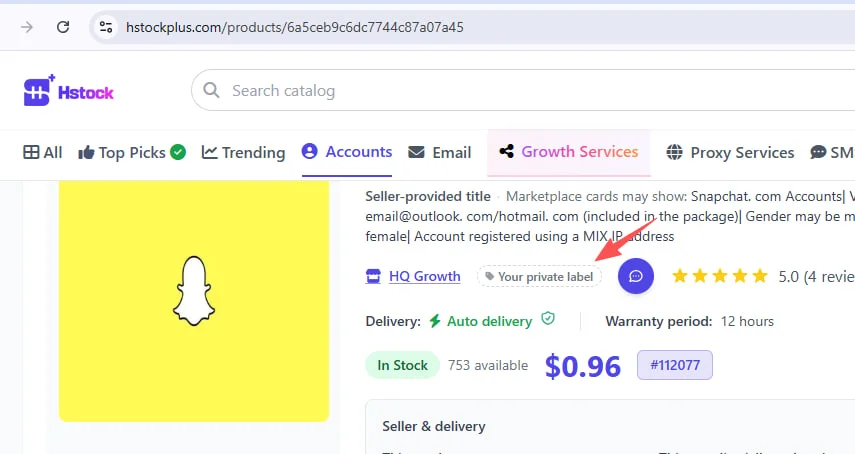
Two small tools that pay off later. Click the heart to add the product to Favorites, which is how you find it again for a reorder. And beside the seller name, click Your private label to tag them Good, Bad, or with a note of your own. The tag is visible only to you, and because it belongs to the seller rather than the listing it also appears on their shop page and on everything else they sell.
Some listings ask you to fill extra fields or choose add-ons before checkout. Fill the required lines so the count matches your quantity, then click Buy Now.
One habit worth keeping: start small with a seller you have not used. A bulk order is much harder to unwind than a single unit if the first batch is not what you expected.
2. Check out and pay
Checkout shows Account Information, Order Details, Payment Method and Order Summary. Guests must enter an email, which is where order updates go; after payment a buyer account is created against that address so you can open the order later. If you would rather have the account first, see how to create a buyer account.
What you can actually pay with
Fewer options than older documentation suggests, so check this against what you were planning:
- Account Balance. Logged-in buyers only. This is how most orders here are paid, by a wide margin: roughly six in seven. Top up first if the balance is short, using the deposit guide.
- Cryptomus. Crypto, settles automatically, three per cent.
- Payeer, meaning Alipay or WeChat Pay. Free and automatic, but capped: twenty dollars per transaction, three hundred per person per day, and a shared daily ceiling per channel across all buyers. Pending attempts count toward those totals until they clear.
- Binance or USDT transfer. A manual transfer that waits for admin review, so it is not a way to get an order moving quickly.
There is no card option. Visa and Mastercard channels exist in the configuration but are switched off, and so are several other gateways you may find named in older guides. If you were counting on paying by card, the practical route is to top up your balance through one of the paths above and pay from there.
The consequence of the Payeer cap deserves saying plainly, because it is the single most common reason a checkout will not complete: an order over twenty dollars cannot be paid with Alipay or WeChat, no matter who you are. Balance and Cryptomus are what carry larger orders.
Discounts, coupons, and one surprise
Logged-in buyers may see a member discount. It is a level tied to what you have spent over the previous 365 days, and it starts at zero: nothing under a hundred dollars, then one, two, three and four per cent at a hundred, five hundred, two thousand and ten thousand. A new account gets nothing, and the checkout page says as much rather than showing you a figure. Growth-service orders are excluded from it entirely.
Coupons apply in Order Summary. Here is the behaviour nobody documents: if the coupon pushes your total below the minimum of the gateway you had selected, checkout moves the order onto Account Balance and tells you it has done so in a small notification. If you are a guest, or logged in without enough balance, you get a different message asking you to choose another method instead. Neither is an error, but if you were watching the total rather than the method, it is easy to miss that the payment route changed under you.
Growth-service orders ask for a profile URL or username on this page. Click Pay Now when the form is complete.
3. Delivery and My Orders
Most orders are filled without anyone touching them, usually within seconds of the payment clearing. Some wait on the seller. Which one you get is decided per order rather than per listing, and how order delivery works covers that properly, including what to do when nothing arrives.
Track everything under Dashboard then My Orders. Tracking your orders explains the status labels, including the one the interface currently renders badly.
4. The confirm button, and why you should not rush it
Open the order, check what was delivered, and only then press the button. It is labelled Confirm Received Products, not "confirm order", and pressing it does three things at once: it releases the money to the seller, it closes the door on a dispute, and it opens the review form.
If nothing turns up, or what turns up is wrong, do not press it. Opening a dispute is the route, and there is also a self-service refund on an undelivered order that does not need a dispute at all; the delivery guide covers it.
If you do nothing, the order confirms itself after a wait set by the seller's level, commonly one to three days. That is what happens to the large majority of orders here, and on an order that arrived correctly it costs you nothing. It costs you something only on an order that did not, which is the entire reason to look before the clock runs out.
Disputes, for scale, are genuinely rare: a few hundred out of nearly a hundred thousand orders. That is worth knowing in both directions. It means the normal case really is uneventful, and it means the dispute route is not a crowded queue if you need it.
5. After you buy
Once you have confirmed, you can score communication, delivery, quality, support and trust on the order page and write a short comment. That review appears on the product and on the shop. You have three days from confirming to edit it, which is the real deadline on this page and the only three-day window that exists.
The private label is worth setting now while you remember the experience. It is for you, not for other buyers, and next time you open that seller anywhere on the site the badge will be there.
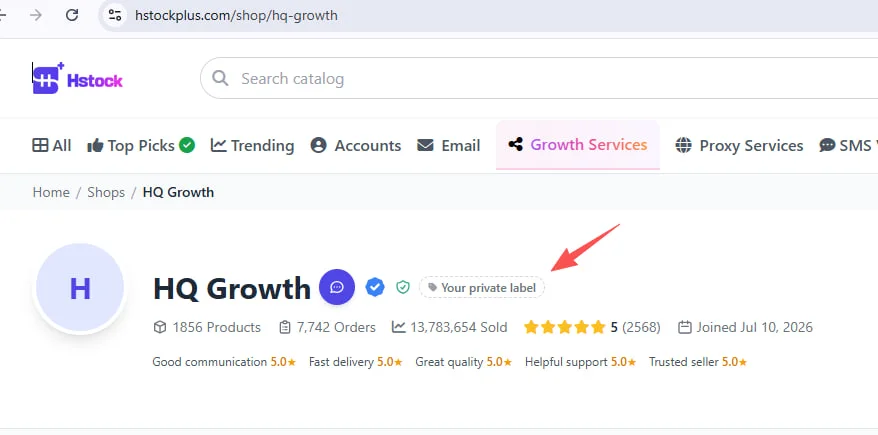
Manage everyone you have tagged under Dashboard then Seller labels, and reach your hearted products from Favorites when you are ready to reorder.