Générer un code 2FA en ligne : ce que vous divulguez, et quand cela ne fonctionnera pas
Un secret TOTP n'est pas un code à usage unique. C'est la clé permanente qui génère chaque futur code, et le coller sur un site web donne à ce site le même pouvoir que vous. Voici comment vérifier où un générateur calcule, et pourquoi un fichier Telegram 2FA ne fonctionnera jamais dans l'un d'eux.
 Michael Chen
Start with the thing most guides on this subject skip, because everything else depends on it.
The six digits your authenticator shows are not your credential. The credential is the string of letters and numbers you scanned or typed in when you set the account up, and it does not expire, rotate or change. Every code that account will ever accept is calculated from that string plus the current time. Anyone holding a copy can produce a valid code at any moment, forever, without your phone and without your password, and there is no log anywhere showing that they did.
Which means the sentence "just paste your 2FA secret into an online generator" is asking for something much larger than it sounds. You are not sharing a code. You are sharing the ability to make codes.
You cannot tell a safe generator from an unsafe one by looking
Two pages can look identical and behave completely differently. One does the arithmetic in your browser and the secret never leaves the machine. The other sends what you typed to a server, does the arithmetic there, and sends six digits back. From the outside both show a box, a button and a countdown.
There is one check you can actually perform, and it takes ten seconds. Load the page, then disconnect from the network, then paste the secret and press the button. A generator that computes locally still works with the network off. A generator that needs a server cannot.
The same check with the browser's developer tools open is more precise: open the network tab before you press the button and watch whether anything is sent. Nothing sent means nothing shared.
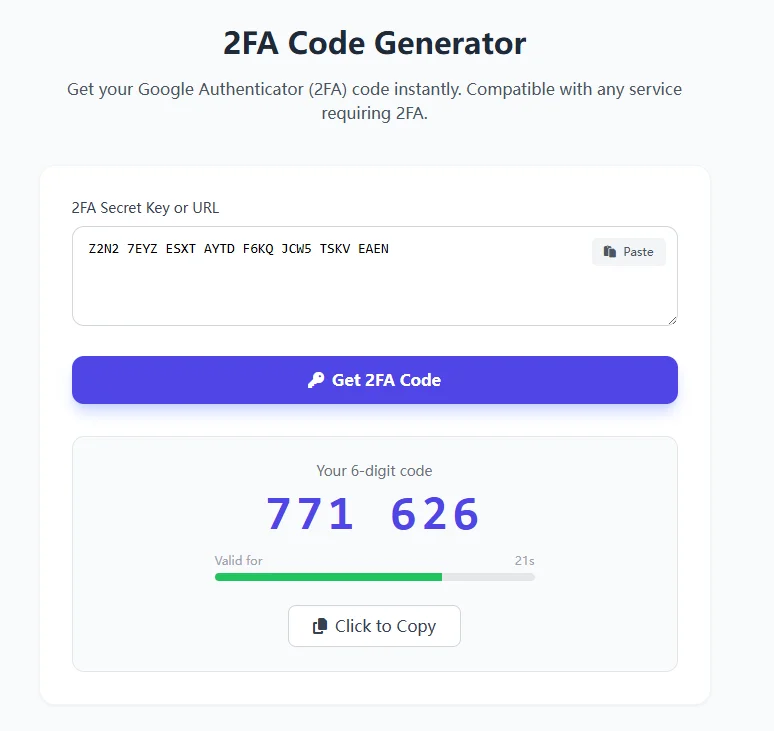
Our own 2FA code generator is the local kind, and you can confirm it either way rather than taking our word for it. The calculation runs entirely in the page, using a library the browser loads once, and no request is made when you press the button. That is worth stating precisely because we would obviously say so either way, and the offline test is the part that does not depend on us.
What the input actually accepts
Two formats work. A raw key, which is a string of uppercase letters and the digits two through seven, usually shown in groups of four with spaces; the spaces are ignored, so you can paste it exactly as your provider displayed it. Or the whole setup link beginning otpauth://, which is what sits behind the QR code you would normally scan. If you can copy that link rather than transcribe a key, do, because it removes the chance of misreading a character.
What does not work is anything else: a password, a recovery code, a backup code, or a string containing the digits zero, one, eight or nine, which the alphabet does not include. If you are getting an invalid key error, check for those digits first.
The parameters are fixed, and that is why some correct keys give wrong codes
Almost every service uses the same three settings, and the tool assumes them: the SHA1 algorithm, six digits, and a new code every thirty seconds. That covers the overwhelming majority of accounts.
A minority of services do something different. Some issue eight digits, some use a sixty-second step, and a few use a stronger hash. Against those, this tool and most others like it will produce a perfectly well-formed six-digit code that is simply wrong, and nothing will tell you why. If your key is definitely correct and the code is definitely rejected, look at what your provider's setup screen said about digits and interval before assuming the key is bad.
One more cause worth ruling out early, because it is common and invisible: the clock. Time-based codes depend on your device agreeing with the server about what time it is. A machine a minute out produces codes that are rejected until you turn automatic time back on.
Telegram 2FA is not this, and pasting it here will never work
This deserves its own section because it produces more failed attempts than anything else on this site.
Telegram's two-step verification is a password. Telegram implements it with a password-proof protocol and supports no authenticator app for account login at all. There is no secret to generate codes from, because there are no codes.
The confusion is entirely reasonable, because the marketplace vocabulary hides it. Twenty live Telegram account listings here state in their own titles that the 2FA arrives "in a text file", and one of them spells out what is in that file: a cloud password. A buyer opens the file, sees a string, assumes it is a key, pastes it into a generator and gets an error.
What to do with a Telegram 2FA file instead: keep it, because it is the password you will be asked for on login and the one you need in order to change or remove two-step verification later. An account delivered with two-step verification switched on and no password in the file is an account you cannot reconfigure. Check for it before the warranty runs out, which on that shelf is usually twelve hours from delivery. The Telegram verification guide covers what else is worth doing in that first day.
If you bought an account, the secret is not exclusively yours
This follows directly from the first section and it is the part buyers most often miss.
A 2FA secret delivered in a text file was generated by somebody else, written down by somebody else, and possibly stored by somebody else. It keeps working for everyone who has a copy, indefinitely, and nothing about receiving it removes anyone else's. It is not like a password, which you can change; the only way to invalidate a secret is to turn two-factor authentication off on the account and switch it back on, which issues a new one.
So on any account you intend to keep, re-enrol. Remove the existing authenticator entry in the platform's own security settings, set it up again, scan the new code into an app you control, and store the new recovery codes. Until you have done that, you are sharing the account with whoever else kept a copy, and you will not be able to tell.
What the market pays for 2FA, and what that actually measures
Across account shelves here, the 2FA tag is on 6,709 live listings, and comparing what those listings cost against the rest of their own shelf produces a pattern worth reading correctly.
The tag commands a real premium on the mail shelves and on Discord, Reddit and GitHub, roughly two to three times the shelf median in each case, and close to six times on Firstmail. It sits at parity on Telegram, Threads and X. It sits below the median on TikTok, YouTube and Apple ID.
The tempting reading is that 2FA is worth more where security matters more. That is not what the numbers say. The multiple tracks how rare the tag is on each shelf. Everywhere it appears on two thirds or more of listings, it prices within a few per cent of parity, because an attribute nearly everything has cannot be a premium no matter how useful it is. On Instagram it is on nearly four listings in five and prices slightly below the median.
The genuinely informative row is Apple ID, where thirty-six tagged listings sit well under the shelf median. That is the one platform in the set where two-factor authentication is effectively compulsory and bound to a trusted device rather than to a string anyone can copy. Where the second factor cannot be handed over in a text file, saying it is present adds nothing to the price.
Two practical consequences. A shelf where 2FA is cheap is usually a shelf where it is either universal or not transferable, not one where sellers are cutting corners. And a listing quoting a large premium for it on a shelf where almost everything has it is charging you for the ordinary.
The short version
- Treat the secret as a permanent key, not a code. It never expires on its own.
- Before pasting it anywhere, disconnect from the network and see whether the page still works. If it does, nothing was sent.
- Paste the
otpauth://link if you have it rather than retyping the key. - If a valid key gives a rejected code, check the digit count, the interval and your device clock before blaming the key.
- If it is a Telegram account, what you have is a password, not a key. It will never produce a code.
- On any account you plan to keep, turn two-factor authentication off and on again to issue yourself a secret nobody else has a copy of.