So bestellen Sie ausverkaufte Produkte auf HstockPlus vor
Jetzt zahlen, vorrätige Einheiten sofort erhalten, den Rest automatisch nach Nachlieferung. Nicht gelieferte Stückzahl bis zur gewählten Zeit geht auf Ihr Guthaben zurück.
Ein Angebot enthält manchmal weniger Konten, als Sie benötigen, oder gar keine. Mit der Vorbestellung zahlen Sie einmal und müssen nicht mehr nachsehen: Sie erhalten, was der Verkäufer gerade hat, und HstockPlus liefert den Rest, sobald der Verkäufer neuen Bestand hochlädt. Außerdem legen Sie eine Frist fest, und alles, was bis dahin noch fehlt, wird Ihrem Guthaben zurückerstattet.
Sofort kaufen oder vorbestellen
Die meisten Angebote zeigen zwei Schaltflächen nebeneinander. Sofort kaufen liefert aus dem aktuellen Bestand. Vorbestellen liefert ebenfalls aus dem aktuellen Bestand und wartet weiter auf den Rest.
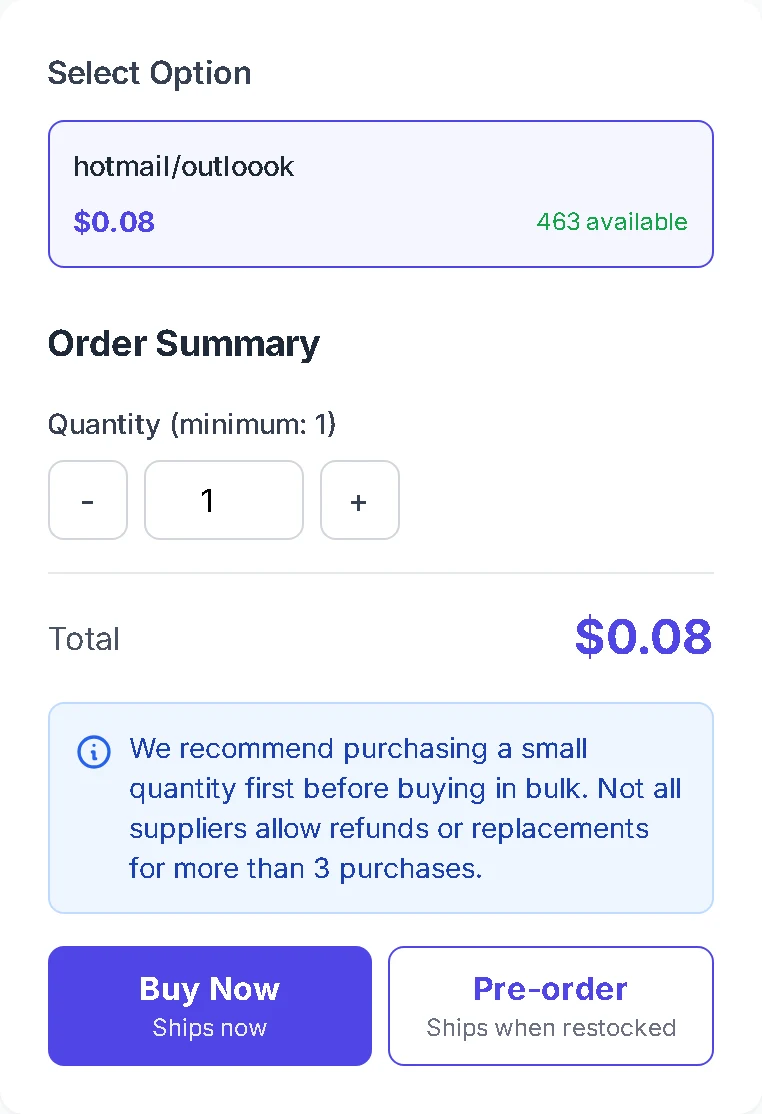
Wenn das Angebot Ihre Menge abdeckt, ist Sofort kaufen die schnellere Wahl. Vorbestellen zählt, wenn Sie mehr möchten, als der Verkäufer vorrätig hat. Verkäufer können Vorbestellungen für ihren Shop oder für ein einzelnes Angebot deaktivieren; dann sehen Sie nur Sofort kaufen.
Mehr bestellen, als der Verkäufer auf Lager hat
Geben Sie die benötigte Menge ein. Übersteigt sie den Bestand, zeigt die Seite an, wie viele verfügbar sind, deaktiviert Sofort kaufen und macht Vorbestellen zur Hauptschaltfläche. Die Beschriftung der Schaltfläche zeigt, wie viele Einheiten sofort geliefert werden.
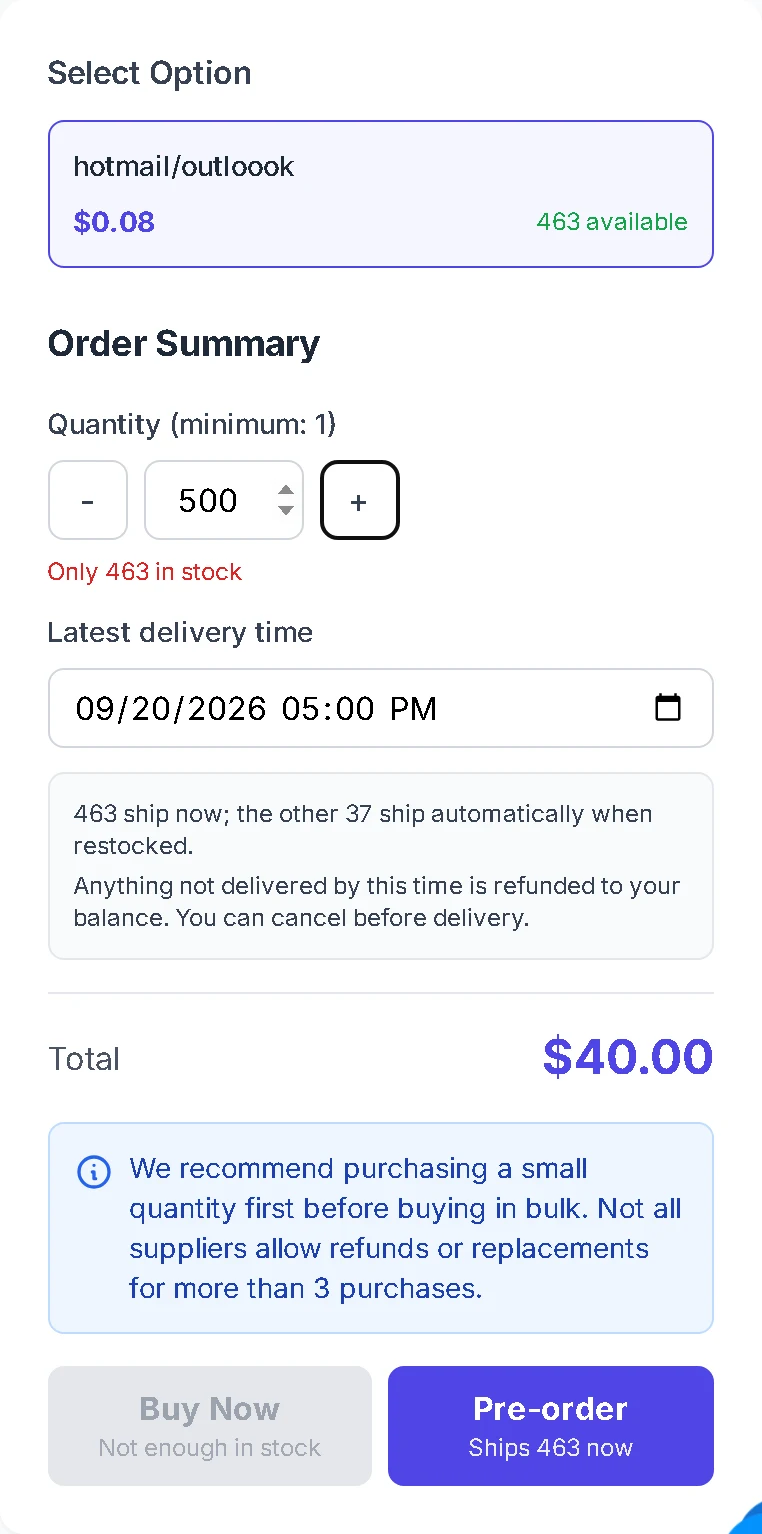
Unterhalb der Menge sehen Sie eine Zusammenfassung der Aufteilung, zum Beispiel 463 Einheiten sofort und 37 bei Wiederauffüllung. Nicht vorrätige Varianten bleiben auswählbar, sodass Sie auch eine Variante vorbestellen können, die null anzeigt.
Eine späteste Lieferzeit wählen
Das Feld Späteste Lieferzeit legt Ihre Frist fest. Es beginnt bei 3 Tagen und lässt sich zwischen 1 Stunde und 30 Tagen ab jetzt verschieben. Wählen Sie den spätesten Zeitpunkt, zu dem die Konten für Sie noch nützlich sind. Ein längeres Zeitfenster gibt dem Verkäufer mehr Zeit zur Wiederauffüllung.
Für eine Vorbestellung müssen Sie angemeldet sein, und jede Vorbestellung umfasst ein einzelnes Produkt.
An der Kasse bezahlen
Klicken Sie auf Vorbestellen, um zur Kasse zu gelangen. Die Bestellübersicht zeigt erneut Ihre späteste Lieferzeit, die Sie dort vor der Zahlung noch ändern können.
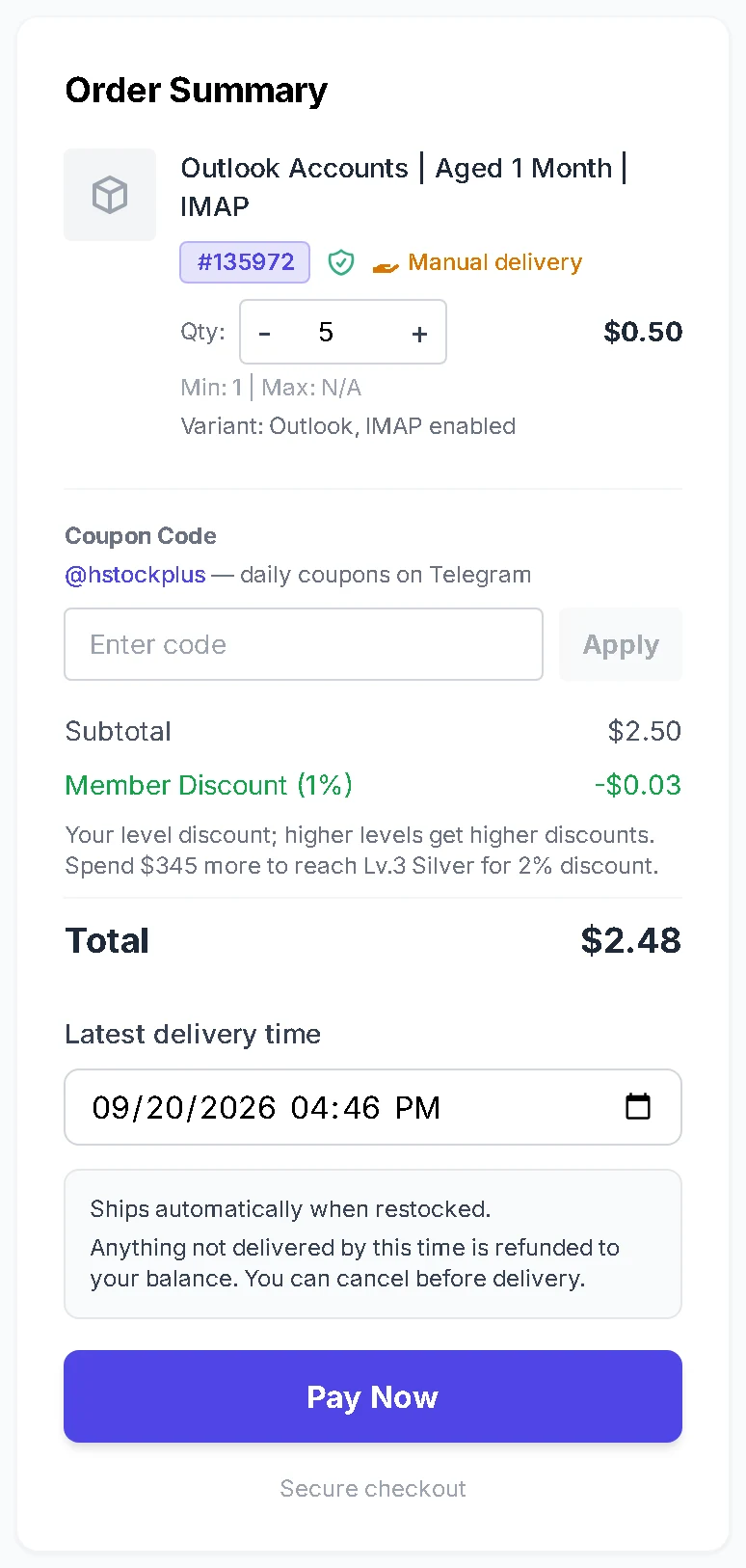
Zahlen Sie mit jeder an der Kasse angebotenen Methode. Zahlungsoptionen und deren Grenzen finden Sie unter How to Place an Order on HstockPlus.
Die Bestellung während der Wartezeit verfolgen
In Ihrer Bestellliste trägt eine wartende Vorbestellung das Abzeichen Wartet auf Bestand. Öffnen Sie sie, um zu sehen, wie viele Einheiten eingetroffen sind, wie viele noch ausstehen und an welchem Datum HstockPlus den Rest erstattet.
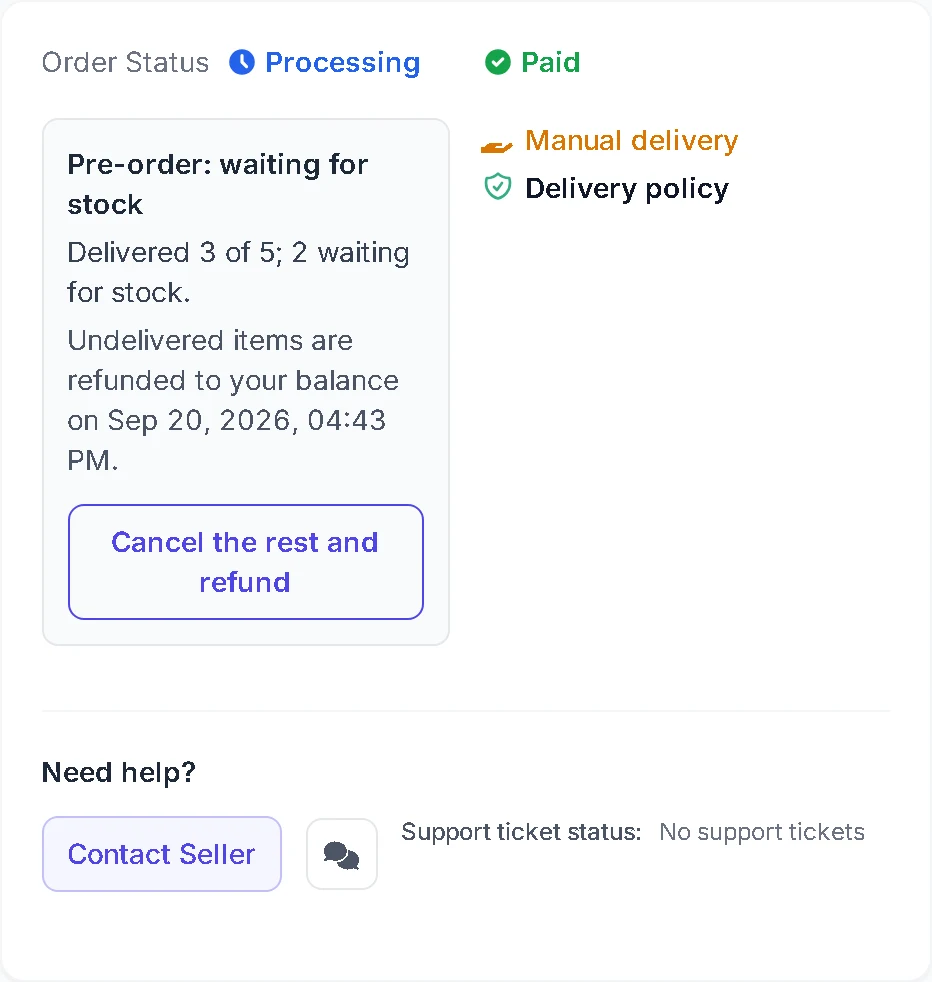
Sobald der Verkäufer den Bestand auffüllt, liefert HstockPlus an wartende Vorbestellungen in der Reihenfolge, in der sie bezahlt wurden. Sie erhalten die Konten auf derselben Bestellseite, ohne neuen Bezahlvorgang.
Den Rest stornieren oder von der Frist erstatten lassen
Meinung geändert? Klicken Sie in der Bestellung auf Rest stornieren und erstatten. HstockPlus erstattet jede nicht gelieferte Einheit auf Ihr Guthaben und schließt die Bestellung mit dem ab, was Sie bereits erhalten haben.
Tun Sie nichts und verstreicht die Frist, erfolgt dieselbe Erstattung von selbst innerhalb weniger Minuten. Erstattungen gehen ausschließlich auf Ihr HstockPlus-Guthaben.
Die regulären automatischen Erstattungen bei langsamer Lieferung gelten nicht für eine Vorbestellung. Ihre späteste Lieferzeit tritt an ihre Stelle, da Sie sich bereit erklärt haben, bis dahin zu warten.
Was Sie davon haben
- Sie müssen die Seite nicht mehr aktualisieren. Die Bestellung wird einmal aufgegeben, der Rest trifft von selbst ein.
- Sie sichern sich Ihren Platz. Wieder aufgefüllte Einheiten gehen an wartende Vorbestellungen in der Reihenfolge, in der sie bezahlt wurden, bevor das Angebot wieder in den Verkauf geht.
- Sie behalten eine Frist. Nichts kann sich über den von Ihnen gewählten Zeitpunkt hinaus hinziehen, und das Geld kehrt ohne Nachfrage auf Ihr Guthaben zurück.
- Sie sichern den heutigen Preis für die gesamte Menge, auch für den Teil, der noch nicht eingetroffen ist.
Verkäufer entscheiden, ob sie Vorbestellungen annehmen
Ein Verkäufer, der keine Wiederauffüllung zusagen kann, kann Vorbestellungen deaktivieren, sodass manche Angebote nur Sofort kaufen zeigen. Das ist eine bewusste Einstellung, kein Fehler, und bedeutet, dass dieser Verkäufer Ihnen lieber nichts verkauft, als Ihnen Einheiten zu schulden.
Wenn Sie auf HstockPlus verkaufen, steuern Sie das an zwei Stellen. Shop-Einstellungen enthält eine Checkbox für den gesamten Shop:

Jedes Produktformular hat dann seine eigene Wahl, die Vorrang vor der Shop-Einstellung hat, sobald Sie sie setzen:

Lassen Sie es auf Use shop setting stehen, folgt das Angebot dem Shop. Wählen Sie Accept pre-orders für eine Linie, die Sie jede Woche auffüllen, und Do not accept pre-orders für eine, die Sie nicht zusagen können. Die Supplier API übernimmt denselben Wert als preorderEnabled beim Produkt-Upsert, und Bestellungen, die auf Bestand warten, tragen awaitingStock und expectedDeliveryAt, damit Sie sie listen und erfüllen können.
Kaufen Sie eine große Menge?
Bei einer Vorbestellung gilt der gelistete Preis. Um den Verkäufer bei einer großen Bestellung um einen niedrigeren Preis zu bitten, senden Sie stattdessen eine Rabattanfrage über den Verkäufer-Chat: How to Ask a Seller for a Bulk Discount on HstockPlus.